Rota: ratios and staffing rules
Purpose
Tell Early Tree the ratios your nursery works to. The EYFS ratios are the floor: a setting can be stricter, never looser. Over-fives have no statutory ratio, so the setting decides.
Before you start
- Know whether your rules apply to the whole group or to one nursery.
Set the rules
- Open Settings and select Ratios and staffing rules.
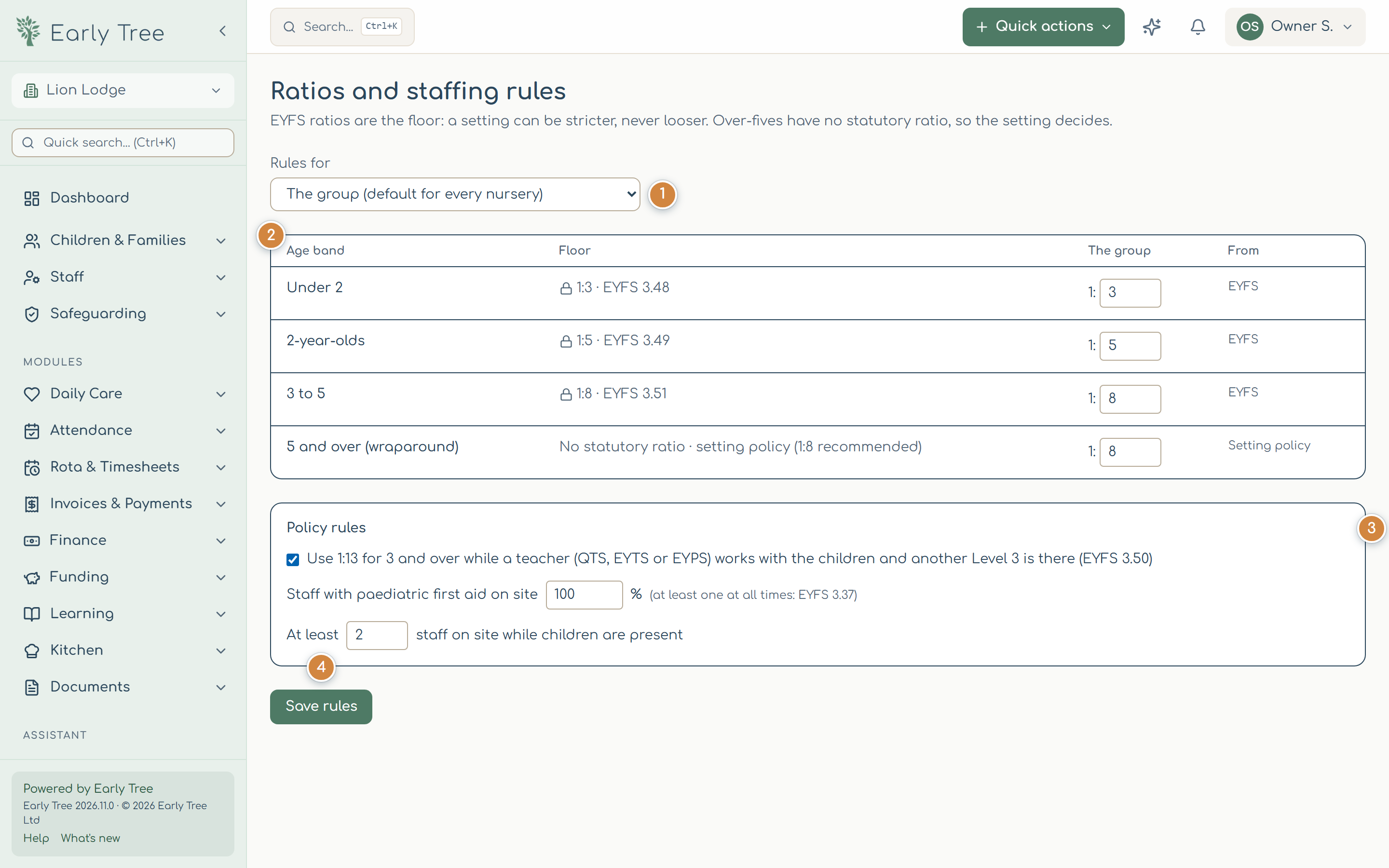
- Under Rules for 1, choose The group (the default for every nursery) or one nursery.
- For each age band 2, enter how many children per member of staff. The floor is shown with its EYFS paragraph; Early Tree won't accept a looser ratio.
- Under Policy rules 3, choose whether to use 1:13 for children aged 3 and over while a teacher (QTS, EYTS or EYPS) works with them and another level 3 is there (EYFS paragraph 3.50), the share of staff with paediatric first aid on site (at least one at all times: paragraph 3.37), and the fewest staff on site while children are present.
- Select Save rules 4.
What you should see
Saved. The rota and the ratio checks use these now.
Common problems
- "…is looser than the EYFS…".
- The number you entered allows more children per member of staff than the law does. Enter the EYFS number or a stricter one.
- "Only an owner can set the group default…".
- Choose your own nursery under Rules for, or ask an owner.