Children: emergency contacts and collection
Purpose
Make sure staff know who to call in an emergency, and who may collect each child. Children may only be released into the care of individuals the parent or carer has explicitly notified to you (EYFS paragraph 3.89). The people you mark here are the ones offered at sign-out on the register.
Before you start
- Only add or change who can collect a child on the parent's or carer's instruction, and follow your nursery's own procedure for confirming it.
- Parents themselves are managed on the family's page (see Families and parent onboarding).
Add or change an emergency contact
- Open the child's record and select the Family & contacts tab.
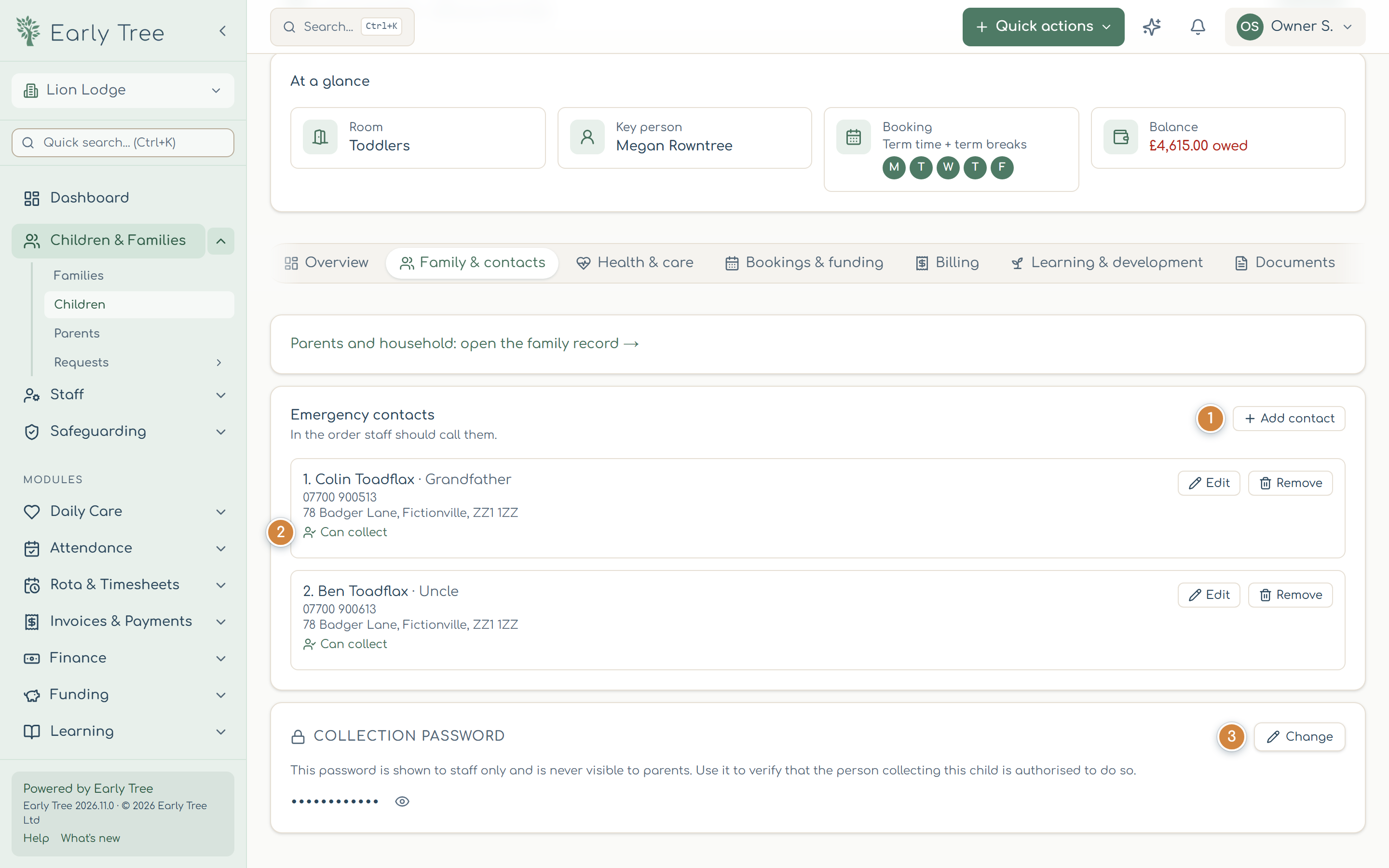
- Under Emergency contacts, select Add contact 1, or Edit next to an existing contact.
- Enter their Name, Relationship and Phone. Call order sets who staff ring first.
- Switch on Can collect the child only if the parent has told you this person may collect. Each contact then shows Can collect 2 or Can't collect.
- Select Save contact.
Set the collection password
A collection password lets staff check that an adult collecting the child is someone the parent has authorised. It's shown to staff only, never to parents through Early Tree, and appears (hidden) at sign-out on the register.
- On the Family & contacts tab, find Collection Password and select Set Password, or Change 3 if there is one.
- Type the password the parent has given you, and select Save. To remove it, select Clear Password.
What you should see
The contact appears in the list in call order with Can collect or Can't collect, and the password shows as dots, with an eye button to reveal it. At sign-out, the contacts who can collect appear as cards to choose from.
Common problems
- An adult arrives to collect who isn't listed.
- Don't release the child. Follow your nursery's collection procedure and speak to the parent before anything else.
- Remove asks me to confirm.
- Removing a contact can't be undone from the record; check you've chosen the right person, then confirm.
- The Phone field won't save.
- Use digits, spaces and + only, for example 07700 900123.