Staff: the single central record
Purpose
Show, in one place, that everyone who works or volunteers at your nursery has been properly checked: identity, DBS and barred list, right to work, references, qualifications and training, with when each was done and who did it. EYFS paragraph 3.18 requires you to record these checks.
Before you start
- The record shows personal details (date of birth, contact details, home address). Only people with permission to see vetting can open it, and every view and export is recorded.
Review the record
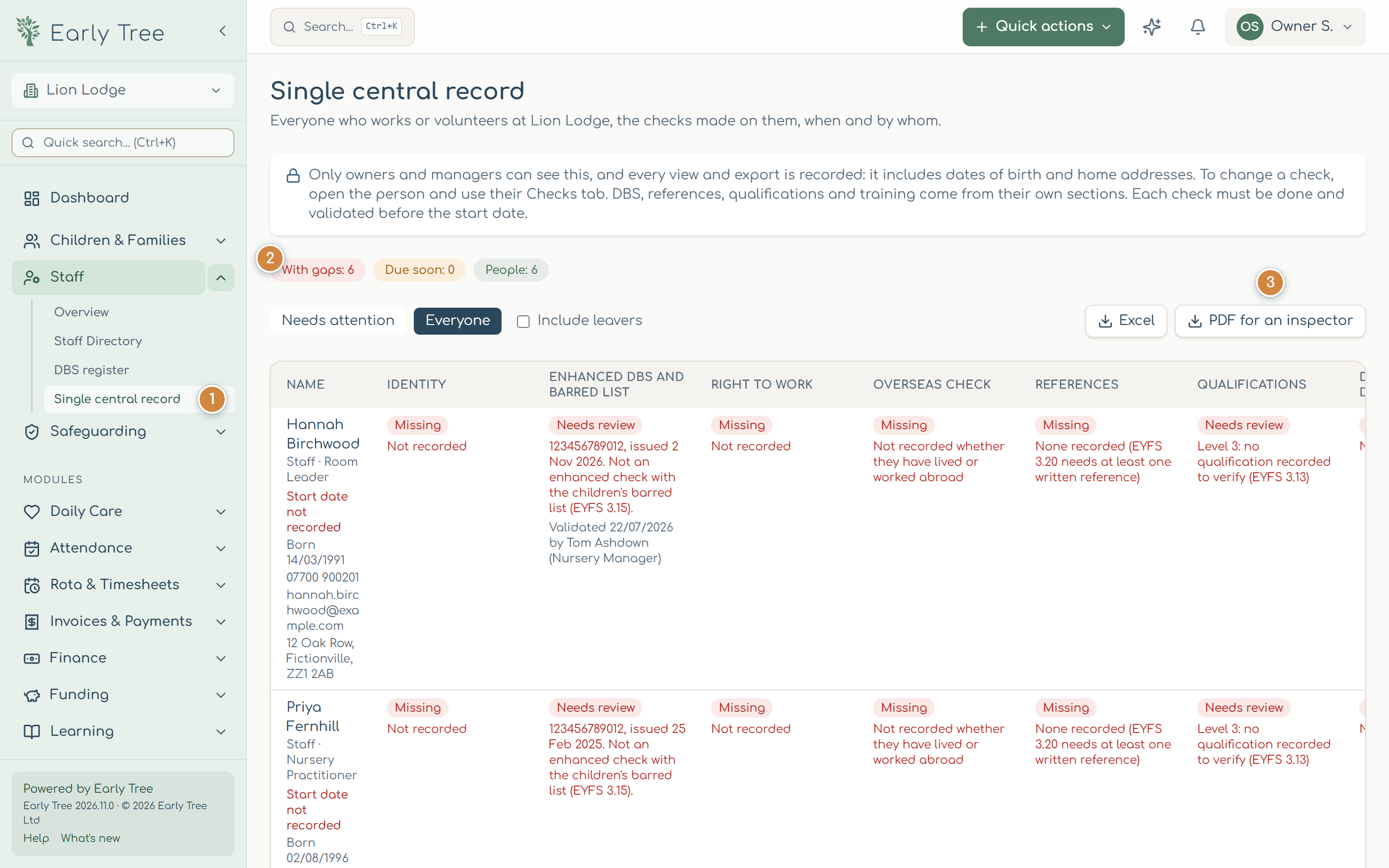
- In the menu, select Staff, then Single central record 1.
- The counts 2 show how many people have gaps and how many checks are due soon. Needs attention shows only them; Everyone shows the whole record, and Include leavers adds people who have left.
- Each row is a person: their role, start date, date of birth and contact details, then a cell for each check showing Done, Due soon, In progress, Missing, Overdue or Needs review, with the date and who validated it.
Fix a gap
Open the person (select their name) and the Checks tab. Each check has its own section: identity, right to work, DBS, references, overseas checks and the disqualification declaration, plus qualifications and training on their own tab. Record what was checked, when and by whom, and select Save as a new check. Earlier checks are kept.
A red warning means a check wasn't done and validated before the person's start date. Nobody may start, or have unsupervised contact with children, before their enhanced check and barred list check (EYFS paragraph 3.17).
Give an inspector a copy
Select PDF for an inspector 3 (or Excel). The export includes the same columns, with date of birth, contact details and home address. Keep it secure.
Common problems
- "Start date not recorded".
- Add their start date under Contract & hours, so the record can tell whether checks were done in time.
- "Address not recorded".
- Add it under Personal details for the record on their Checks tab.
- A reference shows "Not validated yet".
- Record who checked it with the referee, when and their position.