Staff: DBS checks
Purpose
Record each person's enhanced DBS and barred list check before they start, check it again through the DBS Update Service where they've subscribed, and see who needs a new check.
Before you start
- See the original certificate (DBS sends it to the applicant, not to you). Check it for any information that would suggest the person is unsuitable before they have unsupervised contact with children (EYFS paragraph 3.17).
- Before checking someone on the DBS Update Service, get their consent (EYFS 2026, footnote 24 to paragraph 3.17).
Record a check
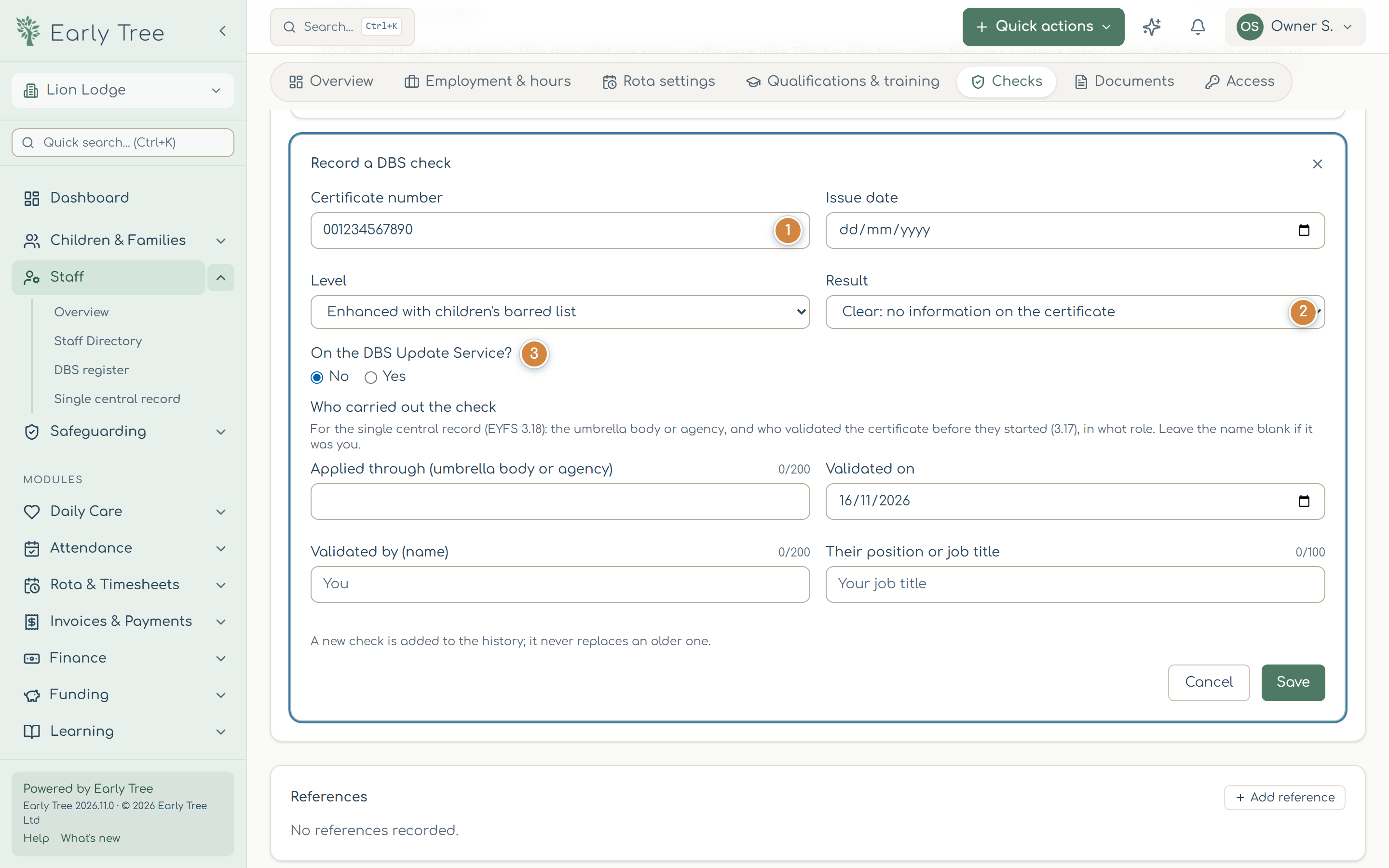
- Open the member of staff's record, the Checks tab, and select Record a DBS check.
- Enter the 12-digit Certificate number 1, the Issue date and the Level.
- Choose the Result 2: Clear: no information on the certificate, Information disclosed (then record your decision and why, but not the disclosure itself), or Applied for, waiting for the certificate.
- Record Who carried out the check: the umbrella body or agency it was applied through, and who validated it, when and their position. EYFS paragraph 3.18 asks you to record the reference number, the date and who obtained it.
- Under On the DBS Update Service? 3, choose Yes if they've subscribed, and record when they agreed to status checks.
- Select Save. A new check never overwrites an earlier one; both stay in the history.
Check on the DBS Update Service
For someone on the Update Service, select Check now with DBS on their DBS check section. Early Tree asks the DBS for the certificate's current status and records the answer. If you checked on the DBS website instead, use Record a check made on the DBS website. If the status shows a change, a new enhanced check must be applied for (EYFS 2026, footnote 24).
Renewals and the DBS register
Staff › DBS register lists everyone's latest check, who validated it, whether they're on the Update Service, and when the next check is due. Needs attention shows the people to act on. In the register's DBS policy, set how often you want a new check and how many days' warning you get.
Certificate copies
You don't need to keep a copy of a DBS certificate. If your setting chooses to, an owner switches on Allow copies of DBS certificates to be stored; copies are then deleted automatically after the number of months you set (6 at most).
Common problems
- "Enter the 12-digit certificate number."
- The number is the 12 digits printed on the certificate.
- The single central record still shows a gap for DBS.
- Check that who validated it, and when, are recorded, and that it was done before the person's start date.