Learning: observations
Purpose
Capture a moment of a child's learning, with photos if you have them, and link it to the areas of learning so it counts towards their progress.
Before you start
- Choose your nursery in the top bar: you can't save an observation without one.
- Check you have the parent's consent for photos of their child.
Record the observation
- In the menu, select Learning, then Observations › Add Observation.
- Under Photos & videos, tap to add up to 10 photos or videos (JPEG, PNG, HEIC or MP4, up to 20 MB each), with a caption each.
- Give it a Title 1.
- Under What did you observe? 2, describe what the child did and said, and what it shows about their learning.
- Under Children 3, search for and select each child it's about.
- Check the Date observed, and choose the Type if you use them (for example Snapshot or Learning story).
- Select Save as draft to finish it later, or Publish 4.
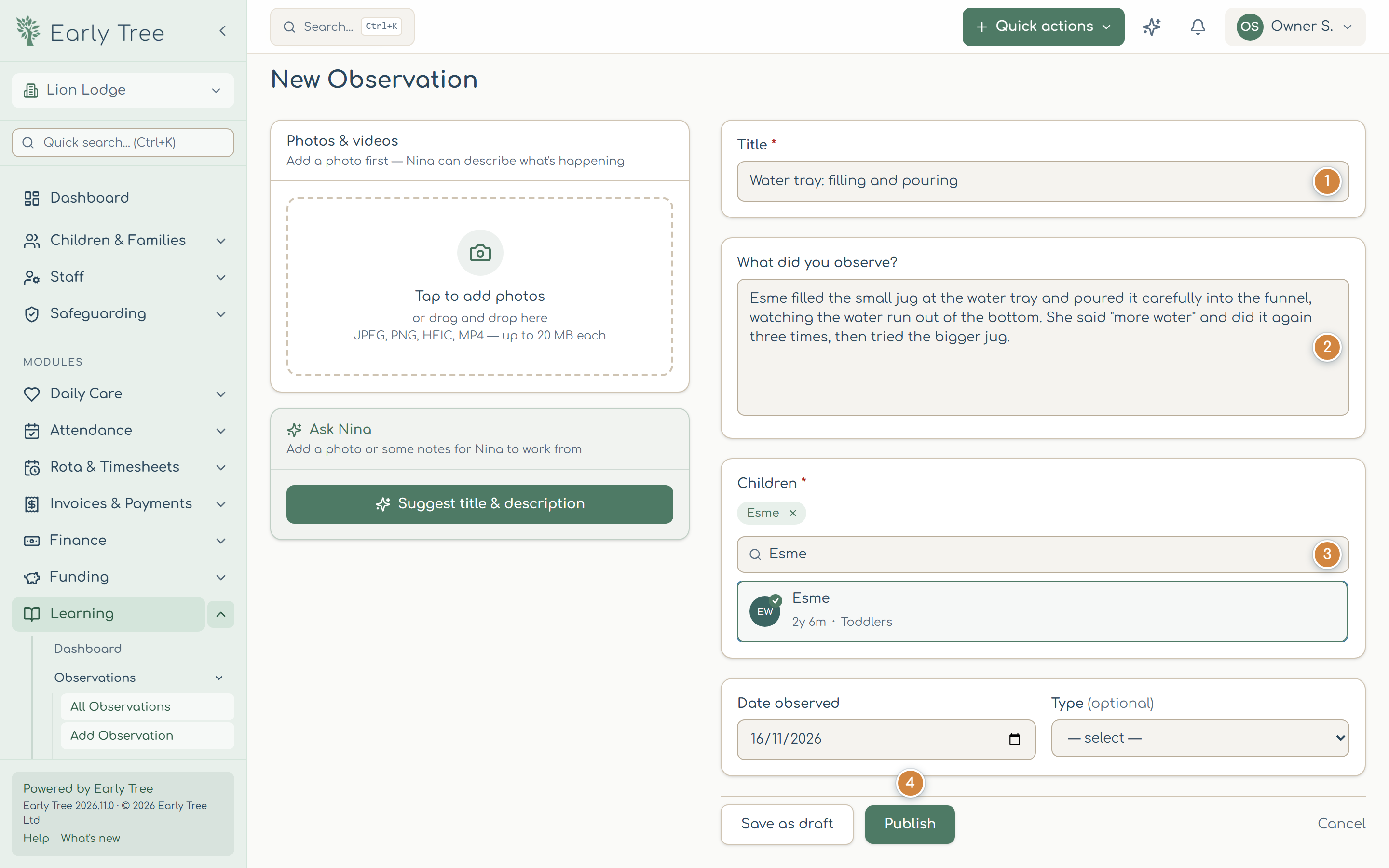
Ask Nina
Ask Nina can suggest a title and description from a photo, and suggest areas and statements when you link the observation to the framework. Check and edit what it suggests: you know the child.
Link it to the framework
- Open the observation and select Review. The page is Link to Framework.
- If your nursery uses both frameworks, choose one.
- Choose an area of learning (for example CL for Communication and Language) and an age band.
- For each statement the observation shows, choose Emerging, Developing or Secure.
- Select Save selected.
What you should see
The observation shows its status (Draft or Published) and the statements it's linked to, and the child's progress in the EYFS tracker includes it.
Common problems
- "Please select a nursery from the top bar."
- Choose your nursery in the selector at the top of the menu, then save again.
- I can't edit an observation.
- Only drafts can be edited. Published observations, and ones shared by a parent, can't be changed.
- Some photos didn't upload.
- The observation was saved without them. Open it, select Edit observation and add them again.